Agent Systems: Architecture Views
Figures
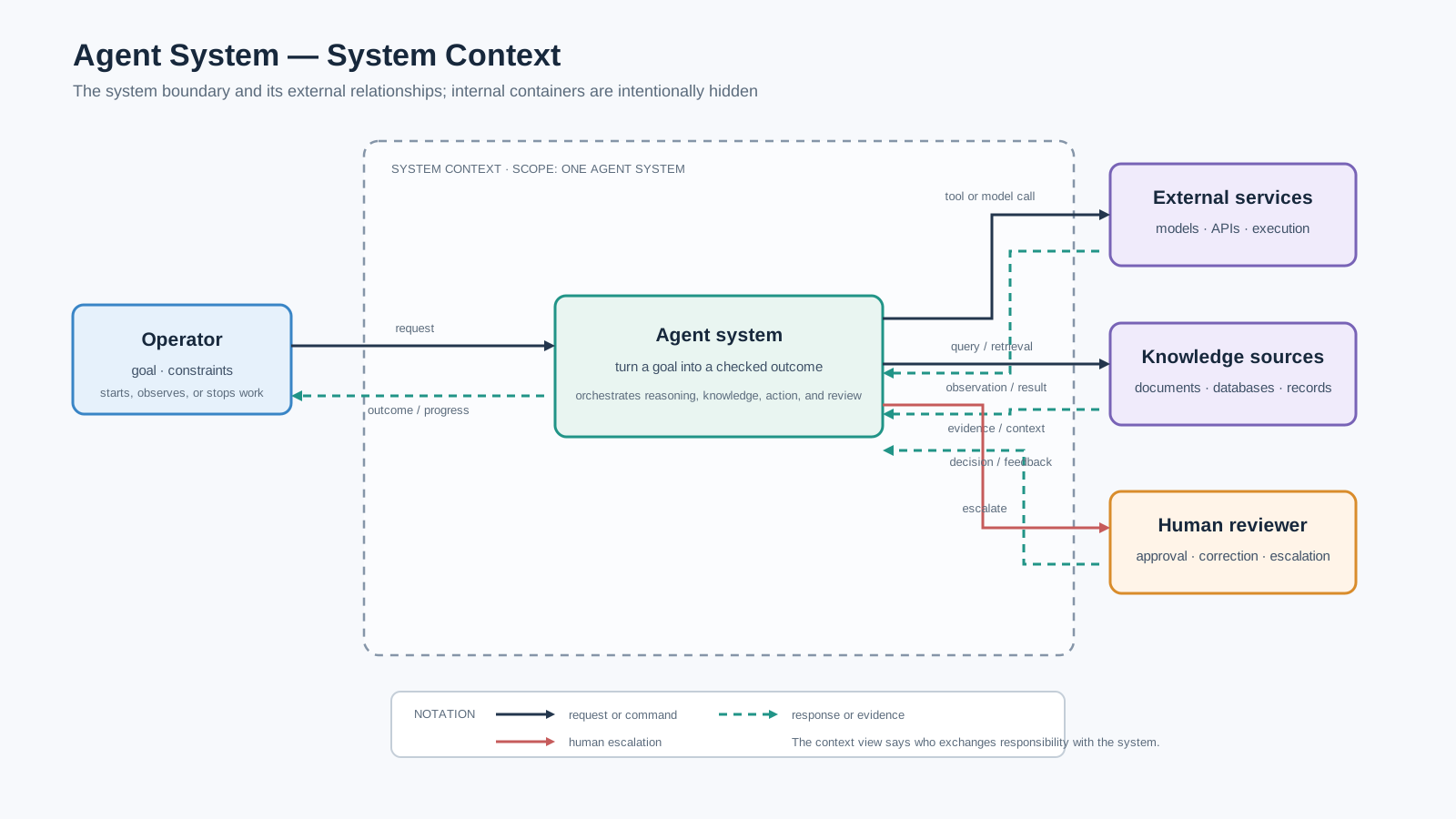
Figure 1. Context view: the agent system is treated as one unit and its external relationships are shown; internal containers are deliberately hidden.
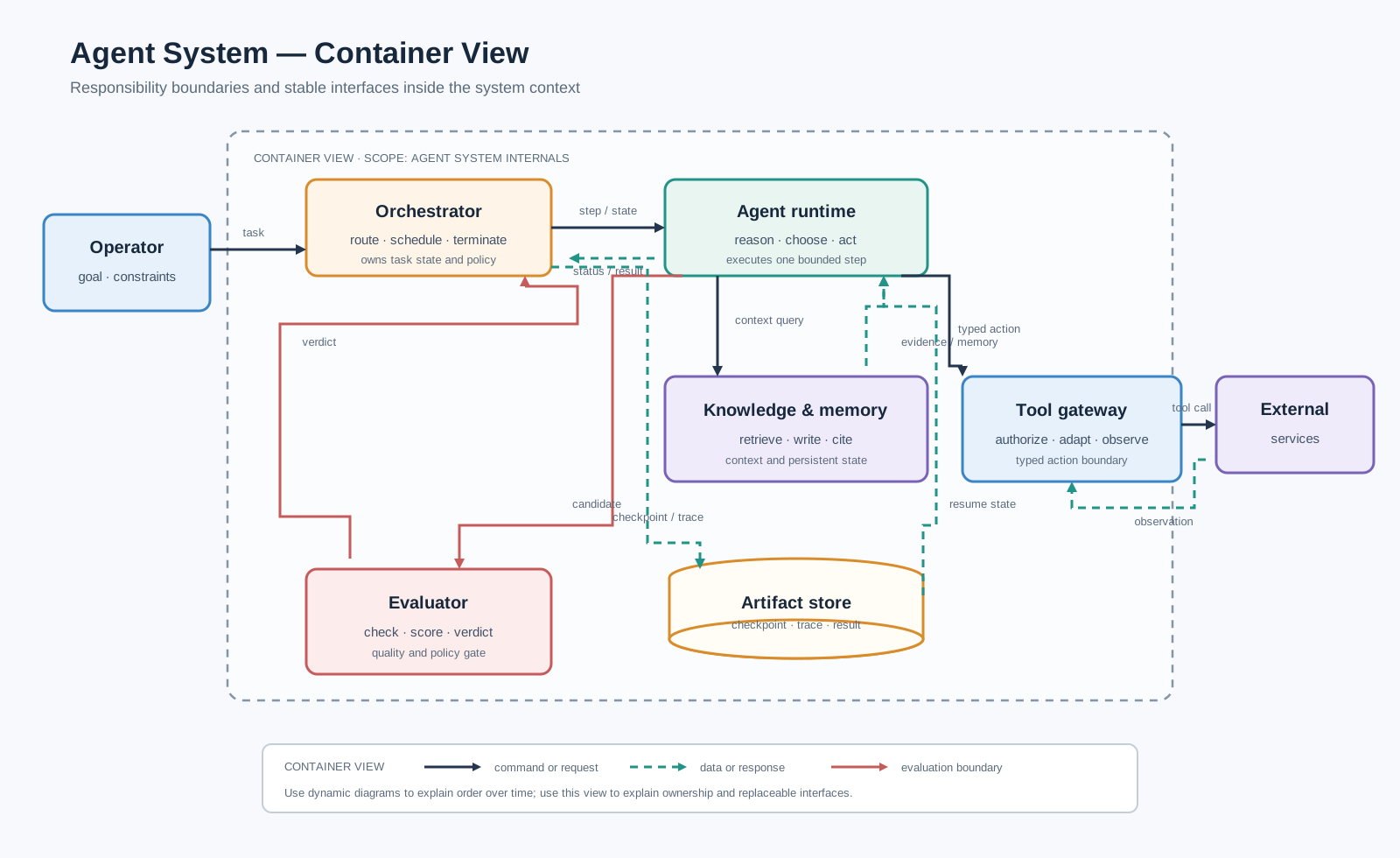
Figure 2. Container view: the system boundary is opened into replaceable responsibilities, stable interfaces, and operational controls.
In one sentence. No single diagram answers every architecture question; read the context, container, dynamic, and operational views in that order.
Why one architecture diagram is not enough
An agent system combines control flow, model calls, tools, knowledge, state, evaluation, and human responsibility. A single picture that shows all of them usually becomes a map of crossing arrows rather than an explanation. Use a small set of views, each with one question and one scope.
Context view: the boundary
The context view treats the agent system as one unit. It identifies the people, services, knowledge sources, and reviewers that exchange responsibility with that unit. It is the right view for introducing the system and for deciding what belongs inside or outside the architecture. Figure 1 gives this view.
Container view: the responsibilities
The container view opens the system boundary. The important design question is not whether every box is an “agent”, but which responsibility owns each stable interface:
- the orchestrator owns task state, routing, policy, and termination;
- the agent runtime performs bounded reasoning and action selection;
- knowledge and memory provide context and persistent state;
- the tool gateway authorizes and adapts external actions;
- the evaluator turns quality or policy requirements into a verdict;
- the artifact store makes checkpoints, traces, and results durable. Figure 2 gives this view; commands, data, and evaluation feedback use distinct arrow conventions.
Dynamic and operational views
Static structure does not explain execution order. Use the tool-use page for a message sequence, the plan-and-execute page for a checkpointed workflow, and the human-in-the-loop page for an approval swimlane. Use the production page for gateways, caching, fallbacks, observability, and evaluation around the runtime.
The figures deliberately share typography, palette, stroke weights, and arrow construction. Their shapes differ because a sequence, a decision, a fork/join, a feedback loop, a data store, and a responsibility boundary are different relations.
Reading rule
Read from outside to inside, then from structure to execution:
context → containers → dynamic behavior → operations → code case
This keeps a complicated architecture visible without forcing one diagram to carry incompatible levels of abstraction.
Real-world application
For an internal research assistant, the context view identifies the operator, source systems, and downstream report; the container view separates retrieval, runtime, evaluation, and storage; and the dynamic view shows the evidence and repair loop. A single diagram cannot answer all three questions without hiding important responsibility boundaries.
Reference notation
The context and container figures are teaching redraws of the first two levels of Simon Brown’s C4 model: a system-context diagram shows the system in its surrounding world, while a container diagram opens the system boundary. Compare the official C4 introduction, the system-context diagram guide, and the complete diagram catalogue.